Why the dbx DriveRack PA2 Fits a Nightclub System
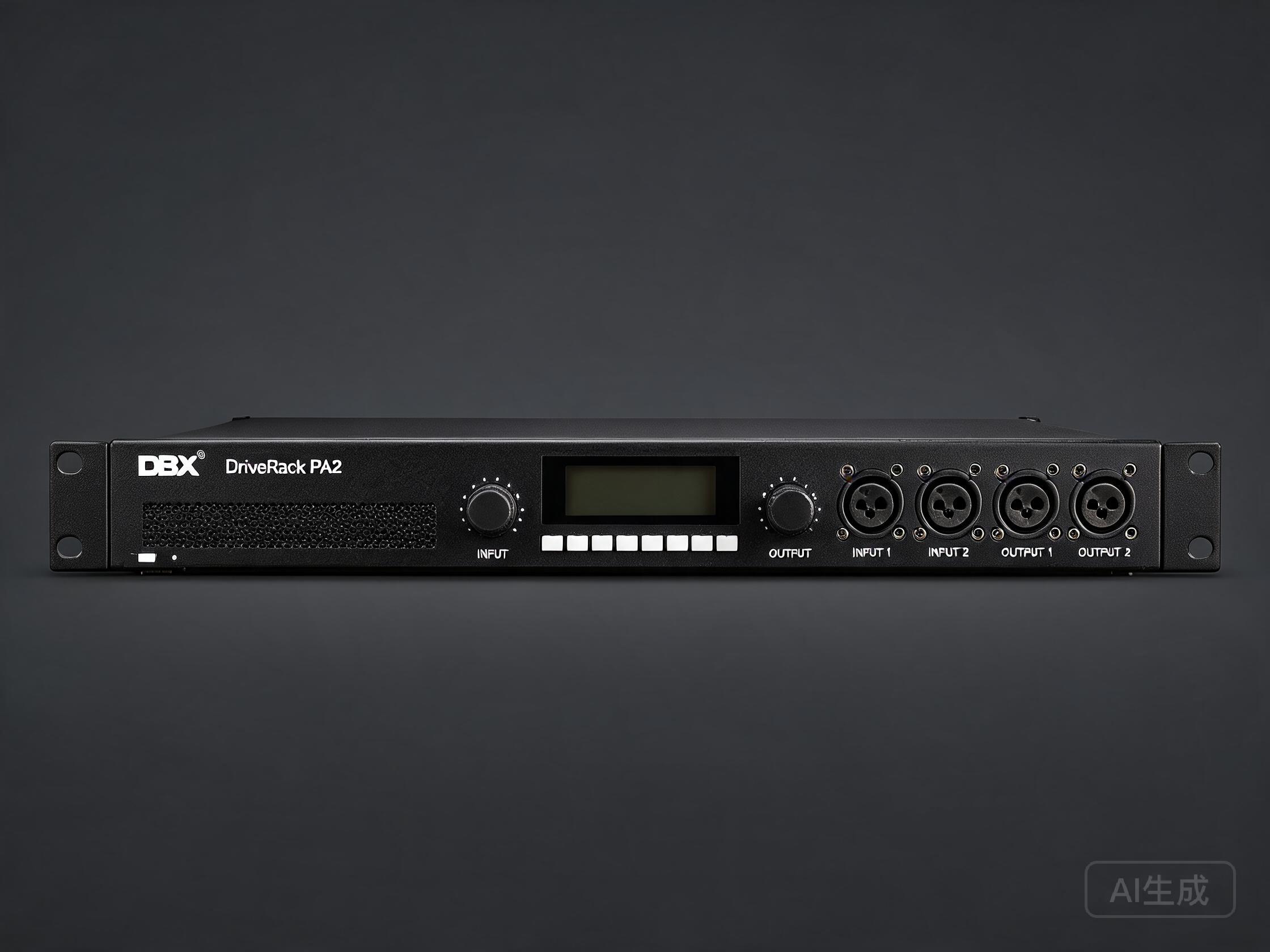
A nightclub sound system lives a hard life. It runs at high SPL for hours, gets pushed by DJs and live acts, and has to sound consistent from the front row to the back bar. The dbx DriveRack PA2 is a loudspeaker management processor built for exactly this job: it sits between your mixer and your amplifiers, handling crossover, EQ, limiting and alignment in one rack unit.
Venue investors and AV integrators choose the PA2 because it is compact, well documented, and quick to configure from the front panel or the free dbx app over Wi-Fi. It gives a club a repeatable, protected signal chain without the cost and complexity of a full touring processor.
> In this guide we look at how to plan a PA2 setup for a nightclub, from input routing through crossover, EQ and limiting. Exact values depend on your specific speakers, so always use the manufacturer's processing data where you have it.
Step 1: Plan the Signal Flow Before You Touch the Rack
Before configuring the PA2, map the system on paper.
- Sources: DJ mixer, house playback, microphone channels, and any live inputs.
- Mix position: the main console or DJ mixer output feeds the PA2 inputs.
- Amplification: how many amp channels you have and which drive subs, tops and fills.
- Zones: main dancefloor, bar area, VIP, and any delay or fill speakers.
A typical club uses a stereo 2-way plus sub configuration: left and right tops plus one or two sub channels. The PA2's routing lets you assign inputs to outputs flexibly, so decide early whether you want a mono sub feed or stereo subs.
Keep gain structure clean: set the mixer output to a sensible nominal level, then set the PA2 input trims so you have headroom before the limiters engage.
Step 2: Configure Crossover and Output Routing
This is the core of any dbx DriveRack PA2 setup for nightclub use. The crossover splits low and high frequencies so each driver only sees the band it is designed for.
- Subwoofer band: typically the low end below the top cabinets' usable range. Set the sub high-pass to protect the driver from subsonic content, and the low-pass to hand over to the tops.
- Top cabinets: set the high-pass to match the cabinet's rated low-frequency limit. Do not run tops full range if they are crossed to subs.
- Slope: steeper slopes (24 dB/octave and above) give cleaner separation but add phase shift. Use what the speaker manufacturer recommends.
- Delay and alignment: if you have delay or fill speakers, use the PA2 output delays to time-align them to the main system.
If you have the speaker maker's preset or processor settings, enter those crossover points and slopes first. They are the safest starting point.
Step 3: EQ, Limiting and Protection
The PA2 gives you parametric EQ and limiters on the outputs, which is where a club system earns its reliability.
- Room EQ: use gentle cuts to tame room resonances rather than boosting holes. A few broad cuts usually beat many narrow boosts.
- Feedback control: notch the worst microphone feedback frequencies if the venue runs vocals or MCs.
- Output limiters: set them to protect the drivers, not to act as a volume control. Leave headroom so transient peaks pass cleanly.
- Input limiting: a light limiter on the input can catch a DJ redlining the mixer.
Document every setting. A club changes staff and DJs; a written record of crossover points, EQ and limiter thresholds keeps the system consistent.
Step 4: Save Presets and Lock the System Down
The PA2 stores presets, which is ideal for a multi-purpose venue.
- Create a house preset for everyday club operation.
- Create a live preset for bands or events with different EQ and limiting.
- Save a safe baseline you can restore if someone edits the system.
- Label outputs clearly so any technician can follow the routing.
Lock or restrict access where the PA2 allows it, so casual adjustments do not undo your alignment work.
Where Acoustrade Fits
Acoustrade supplies tested used pro-audio and KTV equipment to venues and integrators worldwide, including processors and loudspeaker management units like the dbx DriveRack PA2, plus power amplifiers, loudspeakers, line arrays and mixers. If you are building or upgrading a club system, pairing a tested processor with matched amplification and cabinets keeps the signal chain predictable.
FAQ
Q: Can the dbx DriveRack PA2 handle a full nightclub system on its own?
A: It can manage crossover, EQ, limiting and alignment for a typical club system within its input and output count. Very large multi-zone venues may need additional processing or multiple units.
Q: What crossover settings should I use for club subs and tops?
A: Use the settings recommended by your speaker manufacturer. If none are available, start from the cabinets' rated frequency ranges and use steeper slopes for cleaner separation.
Q: Is the PA2 hard to set up without a laptop?
A: No. You can configure it from the front panel, and the dbx app over Wi-Fi makes editing and saving presets easier.
Q: How do I stop DJs from damaging the speakers?
A: Set output limiters to protect the drivers, keep gain structure clean, and lock or restrict system access so settings are not changed during events.
Q: Can I buy a tested used DriveRack PA2 from Acoustrade?
A: Yes. Acoustrade supplies tested used processors and loudspeaker management units alongside amplifiers, speakers and mixers for venue projects.